Well, it does. Tested on the mac. Linux/arm64 does also build (warnings though) from source.
Thanks and greetings!
Moderator: Ras
Thanks a lot for testing, and good to hear it runs on the Mac and builds on Linux/arm64! I'll clean the warnings, and I'm going to try it on a Raspberry Pi myself; if anything could work better with the GUI, don't hesitate to tell me.
Thank you! I would like to complete and stabilise the tournament side first, as it still has things to finish. But I am not closed to the rest: a database, puzzles, or comments, arrows and circles on the board may come later. Season's greetings to you too!cpeters wrote:I don't know whether you want to keep it as a 'GUI for testing and tournaments' - because with some extras [...] this will be "The GUI" for chess (all tasks considered).
Thanks a lot, glad it's useful!RanxXerox wrote: ↑Tue Nov 17, 2026 11:18 am This is just what I've been looking for!
Super job, and much appreciated it's open source.
Two things:
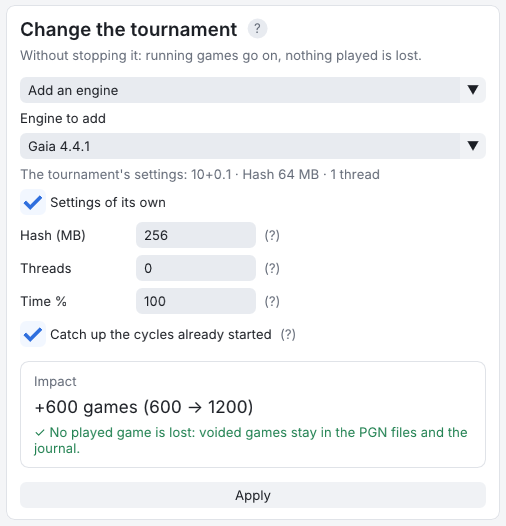
1. When adding an engine to an existing tournament, would it be possible to add it with the default tournament settings or custom settings?
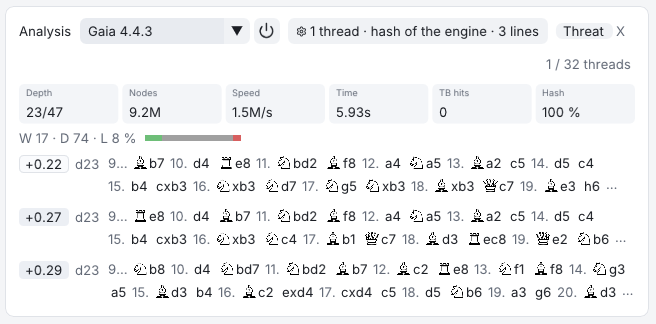
2. Would it be possible to have a "Unload engine" on the board page, that shuts down the analysis engine (kills the engine process)?
Hi Roy,royb wrote: ↑Tue Nov 17, 2026 9:09 pm When I first used fastchess-gui, there was a tab/button that I could click on to see a crosstable of the tournament that was occurring. Now I cannot find that tab/button and I want to make it reappear.
This is undoubtedly something I did, but I'm stuck. If someone can point me to how to make that reappear, I'd sure appreciate it!
Thanks!

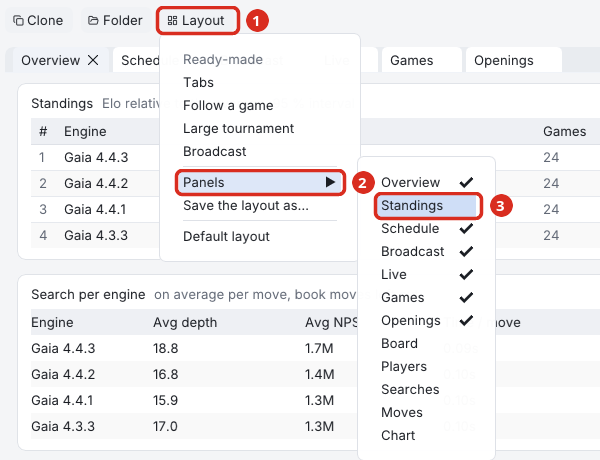
Odd, when I click on Layout and then select Panels, there is no Standings option displayed. The options I see are:j_romang wrote: ↑Wed Nov 18, 2026 7:20 amHi Roy,royb wrote: ↑Tue Nov 17, 2026 9:09 pm When I first used fastchess-gui, there was a tab/button that I could click on to see a crosstable of the tournament that was occurring. Now I cannot find that tab/button and I want to make it reappear.
This is undoubtedly something I did, but I'm stuck. If someone can point me to how to make that reappear, I'd sure appreciate it!
Thanks!
The crosstable is in the Standings tab, with a "Table / Crosstable" choice at the top of it:
Every tab of a tournament is a panel that can be closed (the small × on the tab), moved or made to float. If the Standings tab is gone, it was most likely closed that way. Note that the standings shown in the Overview tab are only the table, without the crosstable. To bring the tab back, use the Layout button, at the right end of the tournament's buttons, then Panels, then Standings:
Layout → Default layout also puts every tab back in its place, and so does Ctrl+K, then typing "standings" and Enter.
If the Standings tab is there but shows a plain table, click Crosstable at the top of it. A round robin of up to 32 engines opens on the crosstable, while a gauntlet, a Swiss or a bigger field opens on the table. A Match between two engines has no Standings tab at all: its Overview shows the result.