fastchess-gui: a light GUI for engine testing and tournaments, built on fastchess

Discussion of anything and everything relating to chess playing software and machines.

Moderator: Ras

cpeters
Posts: 267
Joined: Wed Feb 17, 2021 7:44 pm
Full name: Christian Petersen

Re: fastchess-gui: a light GUI for engine testing and tournaments, built on fastchess

Post by cpeters »

j_romang wrote: ↑Mon Nov 16, 2026 5:46 am Thanks again, and let me know how it works with your machines.

Well, it does. Tested on the mac. Linux/arm64 does also build (warnings though) from source.

Thanks and greetings!
j_romang
Posts: 142
Joined: Mon May 16, 2011 2:52 am

Re: fastchess-gui: a light GUI for engine testing and tournaments, built on fastchess

Post by j_romang »

cpeters wrote: ↑Mon Nov 16, 2026 5:17 pm Well, it does. Tested on the mac. Linux/arm64 does also build (warnings though) from source.

Thanks and greetings!
Thanks a lot for testing, and good to hear it runs on the Mac and builds on Linux/arm64! I'll clean the warnings, and I'm going to try it on a Raspberry Pi myself; if anything could work better with the GUI, don't hesitate to tell me.
cpeters
Posts: 267
Joined: Wed Feb 17, 2021 7:44 pm
Full name: Christian Petersen

Re: fastchess-gui: a light GUI for engine testing and tournaments, built on fastchess

Post by cpeters »

Again, thank you.

I don't know whether you want to keep it as a 'GUI for testing and tournaments' - because with some extras (random enhanced (format/scid?) database schnickschnack and lichess...puzzles...and the possibility to comment and insert some happy colours (circles and arrows) on the board) this will be "The GUI" for chess (all tasks considered).

As of now it's clean and lean and does a lot.

greetings of the season!
j_romang
Posts: 142
Joined: Mon May 16, 2011 2:52 am

Re: fastchess-gui: a light GUI for engine testing and tournaments, built on fastchess

Post by j_romang »

fastchess-gui 0.6.5

Hello everyone,

fastchess-gui 0.6.5 is out for Windows, Linux and macOS: release page. What changed since 0.6.3:
  • Play against an engine on the Board page, in 2D or 3D: choose Human for White or Black. The engine's scores stay hidden until the game ends.
  • Pieces can be dragged as well as clicked; on the 3D board a ghost of the piece follows the pointer.
  • Clone opens the New tournament page with a tournament's setup, to play it again with another time control or engine.
  • A tournament's overview shows each engine's depth, NPS, time per move and processor use.
  • The Live mosaic shows one board per game being played, no more empty boards.
  • End with result now works on macOS. Thanks to Christian on GitHub, who tested it on a real Mac.
  • The build from source gives no warning, with GCC and clang, on Linux, macOS and Windows.
cpeters wrote:I don't know whether you want to keep it as a 'GUI for testing and tournaments' - because with some extras [...] this will be "The GUI" for chess (all tasks considered).
Thank you! I would like to complete and stabilise the tournament side first, as it still has things to finish. But I am not closed to the rest: a database, puzzles, or comments, arrows and circles on the board may come later. Season's greetings to you too!

Bug reports and suggestions are welcome, here or on GitHub.
RanxXerox
Posts: 2
Joined: Sun Nov 15, 2026 7:15 am
Full name: Thomas Stubbe

Re: fastchess-gui: a light GUI for engine testing and tournaments, built on fastchess

Post by RanxXerox »

This is just what I've been looking for!
Super job, and much appreciated it's open source.

Two things:
1. When adding an engine to an existing tournament, would it be possible to add it with the default tournament settings or custom settings?

2. Would it be possible to have a "Unload engine" on the board page, that shuts down the analysis engine (kills the engine process)?
j_romang
Posts: 142
Joined: Mon May 16, 2011 2:52 am

Re: fastchess-gui: a light GUI for engine testing and tournaments, built on fastchess

Post by j_romang »

RanxXerox wrote: ↑Tue Nov 17, 2026 11:18 am This is just what I've been looking for!
Super job, and much appreciated it's open source.

Two things:
1. When adding an engine to an existing tournament, would it be possible to add it with the default tournament settings or custom settings?

2. Would it be possible to have a "Unload engine" on the board page, that shuts down the analysis engine (kills the engine process)?
Thanks a lot, glad it's useful!

Both are in 0.6.6: https://github.com/jromang/fastchess-gu ... tag/v0.6.6

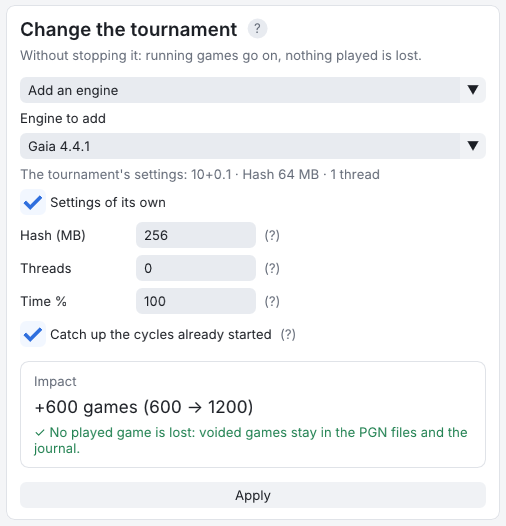
1. An engine added to a running tournament used to take the time control, Hash and Threads of the tournament's first
engine, including that engine's own settings (time odds, its own Hash...). It now takes the tournament's settings,
shown under the engine, or settings of its own: tick Settings of its own and give it its Hash, Threads, share
of the time (or nodes, depth), as on the setup page. Replace an engine works the same way. A tournament started
with an older version did not record its settings, so there the first engine's still stand in: use Settings of its
own
if they are not the right ones.

Image

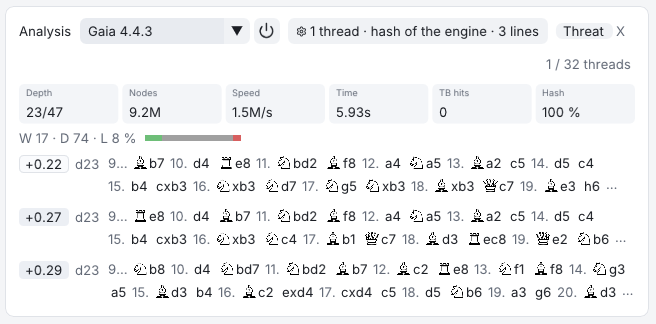
2. The power button next to the analysis engine, Unload the engine (also in the command palette, Ctrl+K), ends
the engine process, and the threat engine's too: its hash table, and for Lc0 its GPU memory, are freed. Analyse
starts it again. Stop the analysis still only stops the search, so starting again stays instant.

Image

Thanks for the suggestions!
royb
Posts: 586
Joined: Thu Mar 09, 2006 12:53 am

Re: fastchess-gui: a light GUI for engine testing and tournaments, built on fastchess

Post by royb »

When I first used fastchess-gui, there was a tab/button that I could click on to see a crosstable of the tournament that was occurring. Now I cannot find that tab/button and I want to make it reappear.

This is undoubtedly something I did, but I'm stuck. If someone can point me to how to make that reappear, I'd sure appreciate it!

Thanks!

j_romang
Posts: 142
Joined: Mon May 16, 2011 2:52 am

Re: fastchess-gui: a light GUI for engine testing and tournaments, built on fastchess

Post by j_romang »

royb wrote: ↑Tue Nov 17, 2026 9:09 pm When I first used fastchess-gui, there was a tab/button that I could click on to see a crosstable of the tournament that was occurring. Now I cannot find that tab/button and I want to make it reappear.

This is undoubtedly something I did, but I'm stuck. If someone can point me to how to make that reappear, I'd sure appreciate it!

Thanks!
Hi Roy,

The crosstable is in the Standings tab, with a "Table / Crosstable" choice at the top of it:

Image

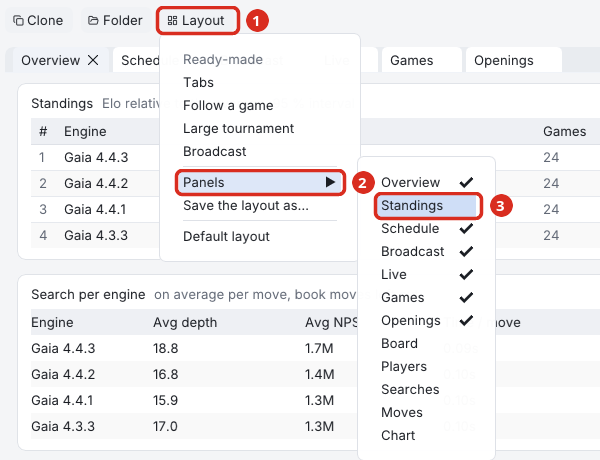
Every tab of a tournament is a panel that can be closed (the small × on the tab), moved or made to float. If the Standings tab is gone, it was most likely closed that way. Note that the standings shown in the Overview tab are only the table, without the crosstable. To bring the tab back, use the Layout button, at the right end of the tournament's buttons, then Panels, then Standings:

Image

Layout → Default layout also puts every tab back in its place, and so does Ctrl+K, then typing "standings" and Enter.

If the Standings tab is there but shows a plain table, click Crosstable at the top of it. A round robin of up to 32 engines opens on the crosstable, while a gauntlet, a Swiss or a bigger field opens on the table. A Match between two engines has no Standings tab at all: its Overview shows the result.
royb
Posts: 586
Joined: Thu Mar 09, 2006 12:53 am

Re: fastchess-gui: a light GUI for engine testing and tournaments, built on fastchess

Post by royb »

j_romang wrote: ↑Wed Nov 18, 2026 7:20 am
royb wrote: ↑Tue Nov 17, 2026 9:09 pm When I first used fastchess-gui, there was a tab/button that I could click on to see a crosstable of the tournament that was occurring. Now I cannot find that tab/button and I want to make it reappear.

This is undoubtedly something I did, but I'm stuck. If someone can point me to how to make that reappear, I'd sure appreciate it!

Thanks!
Hi Roy,

The crosstable is in the Standings tab, with a "Table / Crosstable" choice at the top of it:

Image

Every tab of a tournament is a panel that can be closed (the small × on the tab), moved or made to float. If the Standings tab is gone, it was most likely closed that way. Note that the standings shown in the Overview tab are only the table, without the crosstable. To bring the tab back, use the Layout button, at the right end of the tournament's buttons, then Panels, then Standings:

Image

Layout → Default layout also puts every tab back in its place, and so does Ctrl+K, then typing "standings" and Enter.

If the Standings tab is there but shows a plain table, click Crosstable at the top of it. A round robin of up to 32 engines opens on the crosstable, while a gauntlet, a Swiss or a bigger field opens on the table. A Match between two engines has no Standings tab at all: its Overview shows the result.
Odd, when I click on Layout and then select Panels, there is no Standings option displayed. The options I see are:

Overview
Broadcast
Live
Games
Openings
Board
Players
Searches
Moves
Chart

Standings is not an option. I'm on Mac, if that makes a difference.
j_romang
Posts: 142
Joined: Mon May 16, 2011 2:52 am

Re: fastchess-gui: a light GUI for engine testing and tournaments, built on fastchess

Post by j_romang »

Thanks, that list tells me what's probably going on, and it has nothing to do with the Mac. Standings and Schedule are both missing, which most likely means the tournament you're looking at is a Match: two engines, A against B. You can check it in the grey line above the tournament's name, which starts with "Match" in that case.

A Match has no Standings tab and no crosstable. With only one pair of engines there is nothing to cross, and its result (score, Elo, and so on) is in the Overview tab. Match is also the format a new tournament starts with, so it's easy to end up there.

To get the crosstable back, start a new tournament, choose Round robin as the format at the top of the New tournament page, and add your engines. Its Standings tab then opens on the crosstable, as in your first tournament.