What does this function ?
ECE Intuition Chess
Moderator: Ras
-
Rebel

- Posts: 7619
- Joined: Thu Aug 18, 2011 12:04 pm
- Full name: Ed Schröder
Re: ECE Intuition Chess
90% of coding is debugging, the other 10% is writing bugs.
-
LuiVis
- Posts: 22
- Joined: Sat Jun 22, 2019 5:19 am
- Full name: Luigino Viscione
Re: ECE Intuition Chess
Many years ago I used a simple chess GUI that I really liked for running engine tournaments and testing my own (rather humble!) engines: ChessGUI. I don't know how many of you remember it, but I think it's a pity that its development wasn't continued.
One feature I particularly liked was the possibility of showing engine matches live by generating a Live PGN. At that time, if I remember correctly, pgn4web was commonly used to display these games on a website.
So I tried to implement something similar in ECE.
During engine tournaments, ECE generates tournament results and crosstables in HTML/text format, the tournament PGN, and also a Live PGN that is continuously updated as the games progress.
However, to be completely honest, I haven't received enough feedback about this feature yet, and I haven't had a proper opportunity to test it on a real live website. So I can't guarantee that every generated piece of information is interpreted correctly by current web PGN viewers.
ECE Chess is mainly designed around chess players rather than engine testing. It supports engine tournaments and provides the related tools, but unlike some other GUIs, its primary purpose isn't just testing engines. The idea is to provide a GUI for people who play, study and analyse chess, while also allowing them to use and experiment with chess engines.
That's basically what the Live PGN feature is about.
Luigino Viscione
Developer of ECE / ECE Chess GUI
https://www.ecechess.it
luigino.viscione@gmail.com
One feature I particularly liked was the possibility of showing engine matches live by generating a Live PGN. At that time, if I remember correctly, pgn4web was commonly used to display these games on a website.
So I tried to implement something similar in ECE.
During engine tournaments, ECE generates tournament results and crosstables in HTML/text format, the tournament PGN, and also a Live PGN that is continuously updated as the games progress.
However, to be completely honest, I haven't received enough feedback about this feature yet, and I haven't had a proper opportunity to test it on a real live website. So I can't guarantee that every generated piece of information is interpreted correctly by current web PGN viewers.
ECE Chess is mainly designed around chess players rather than engine testing. It supports engine tournaments and provides the related tools, but unlike some other GUIs, its primary purpose isn't just testing engines. The idea is to provide a GUI for people who play, study and analyse chess, while also allowing them to use and experiment with chess engines.
That's basically what the Live PGN feature is about.
Luigino Viscione
Developer of ECE / ECE Chess GUI
https://www.ecechess.it
luigino.viscione@gmail.com
-
LuiVis
- Posts: 22
- Joined: Sat Jun 22, 2019 5:19 am
- Full name: Luigino Viscione
Re: ECE Intuition Chess
ECE Intuition Chess 26.8.083007
MAJOR RELEASE UPDATE! — 08 August 2026
A new major update of ECE Intuition Chess is now available!
Main changes:
• ECE FICS — ECE now includes its own FICS client, which can be launched directly from ECE or played online at:
https://ecechess.it/play/play.html
ECE FICS is derived from Free Chess Club 4.7.2 and has now been updated to use Stockfish 18, replacing the previous Stockfish 17.1 engine.
The ECE FICS source code is available on the ECE website:
https://ecechess.it
• Opening Lines — Opening lines are now displayed during unrated training games, making it easier to study and explore openings while playing.
• Puzzle Mode — More than 80,000 chess puzzles, selected from the Lichess Puzzle Database and organized by theme and playing strength.
• ECE Puzzle Rating (EPR) — A dedicated puzzle rating system that adapts according to your results and the difficulty of the selected puzzles.
• Independent Time Controls — White and Black can now have different time controls. For example, White can play with 10 minutes while Black has 15 minutes, or vice versa. This can be useful for training, handicap games and experimental matches.
• Improved PGN and Analysis — PGN handling and post-game analysis have been improved, including the ability to save the PGN after a game or full-game analysis.
• Improved Interface Stability — Several optimizations reduce unnecessary board and interface refreshes, providing a smoother and more stable experience during games and analysis.
• Improved game controls and protection against accidental changes during active games.
• Improved language pack management.
• Several interface improvements and optimizations.
...and much more, along with many other bug fixes.
If you find any bugs or unexpected behaviour, please report them. Every report helps me improve ECE.
Thank you!
Luigino Viscione
Developer of ECE / ECE Chess GUI
https://www.ecechess.it
luigino.viscione@gmail.com
MAJOR RELEASE UPDATE! — 08 August 2026
A new major update of ECE Intuition Chess is now available!
Main changes:
• ECE FICS — ECE now includes its own FICS client, which can be launched directly from ECE or played online at:
https://ecechess.it/play/play.html
ECE FICS is derived from Free Chess Club 4.7.2 and has now been updated to use Stockfish 18, replacing the previous Stockfish 17.1 engine.
The ECE FICS source code is available on the ECE website:
https://ecechess.it
• Opening Lines — Opening lines are now displayed during unrated training games, making it easier to study and explore openings while playing.
• Puzzle Mode — More than 80,000 chess puzzles, selected from the Lichess Puzzle Database and organized by theme and playing strength.
• ECE Puzzle Rating (EPR) — A dedicated puzzle rating system that adapts according to your results and the difficulty of the selected puzzles.
• Independent Time Controls — White and Black can now have different time controls. For example, White can play with 10 minutes while Black has 15 minutes, or vice versa. This can be useful for training, handicap games and experimental matches.
• Improved PGN and Analysis — PGN handling and post-game analysis have been improved, including the ability to save the PGN after a game or full-game analysis.
• Improved Interface Stability — Several optimizations reduce unnecessary board and interface refreshes, providing a smoother and more stable experience during games and analysis.
• Improved game controls and protection against accidental changes during active games.
• Improved language pack management.
• Several interface improvements and optimizations.
...and much more, along with many other bug fixes.
If you find any bugs or unexpected behaviour, please report them. Every report helps me improve ECE.
Thank you!
Luigino Viscione
Developer of ECE / ECE Chess GUI
https://www.ecechess.it
luigino.viscione@gmail.com
-
LuiVis
- Posts: 22
- Joined: Sat Jun 22, 2019 5:19 am
- Full name: Luigino Viscione
Re: ECE Intuition Chess
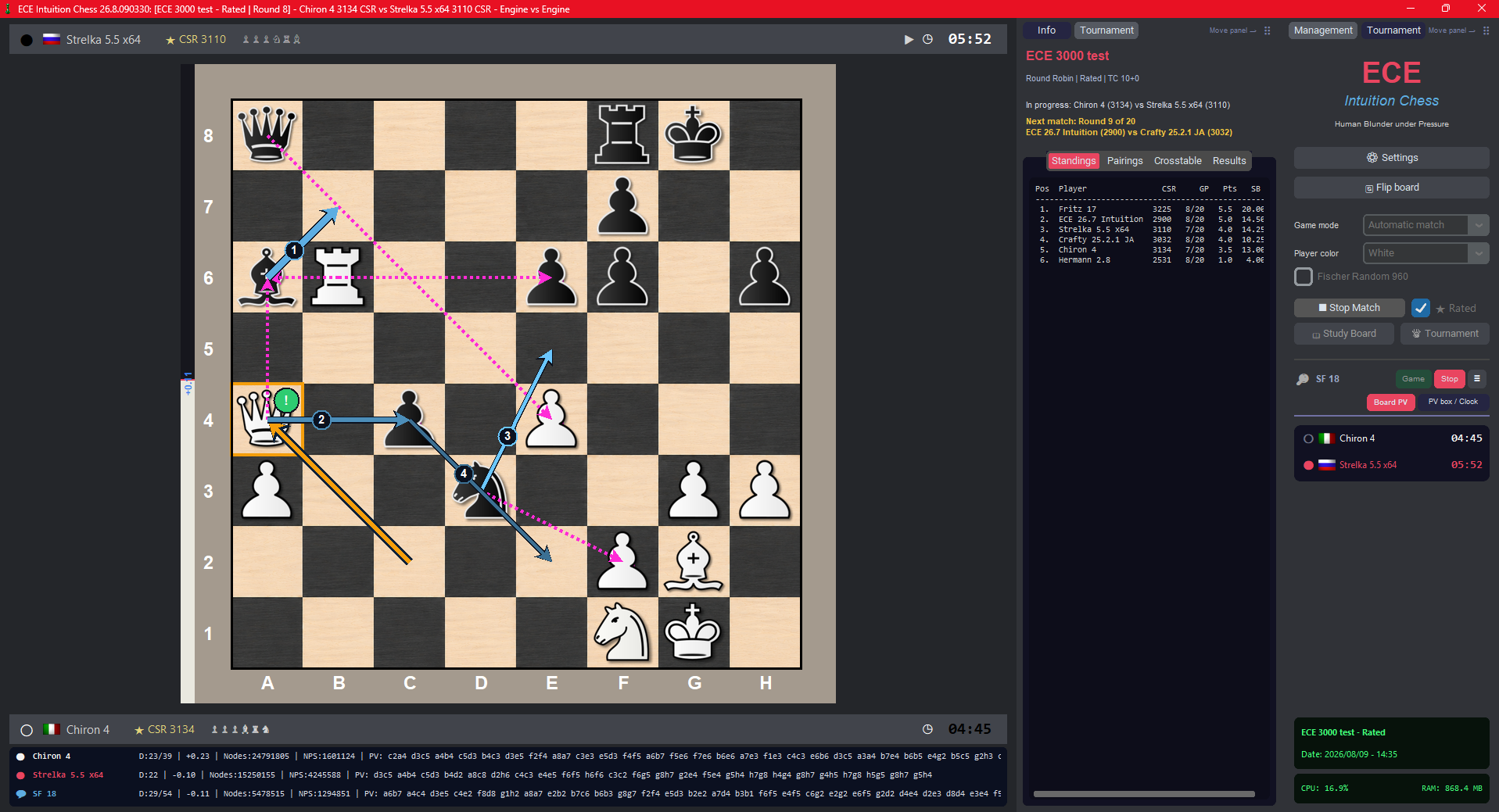
ECE Chess 26.8.090330 is now available
A new version of ECE Chess has been released with several GUI and usability improvements.
Main updates include:
The complete package is also available from:
https://ecechess.it
Thank you to everyone testing ECE Chess and providing feedback!
Luigino Viscione
Developer of ECE / ECE Chess GUI
https://ecechess.it
[luigino.viscione@gmail.com](mailto:luigino.viscione@gmail.com)
A new version of ECE Chess has been released with several GUI and usability improvements.
Main updates include:
- New tournament tabs with standings, pairings, crosstable and results
- Optional engine PV information displayed under the chessboard
- Improved tournament information and progress display
- Single-profile export and import using portable .eceprofile files
- Several interface, memory-management and stability improvements
The complete package is also available from:
https://ecechess.it
Thank you to everyone testing ECE Chess and providing feedback!
Luigino Viscione
Developer of ECE / ECE Chess GUI
https://ecechess.it
[luigino.viscione@gmail.com](mailto:luigino.viscione@gmail.com)
-
LuiVis
- Posts: 22
- Joined: Sat Jun 22, 2019 5:19 am
- Full name: Luigino Viscione
Re: ECE Intuition Chess
## ECE Intuition Chess GUI 26.8.090339 – ECE Engine 26.8, Chess960 improvements, new 2.5D Board and analysis enhancements
Hi everyone,
ECE Intuition Chess GUI 26.8.090339 is now available.
This release includes the matching ECE Engine 26.8 Intuition HBuP directly in the GUI package, together with updated personality support, Chess960/Fischer Random improvements, a new 2.5D board presentation, visual refinements and a revised game-analysis graph.
### ECE Engine 26.8 included in the GUI package
ECE Intuition Chess GUI 26.8.090339 includes ECE Engine 26.8 Intuition HBuP as part of the standard distribution.
The engine remains usable separately as a normal UCI engine in other compatible chess GUIs, while the ECE GUI provides deeper integration with its personality system, tournaments, analysis tools and player-management features.
The ECE 26.8 distribution includes the engine personalities, opening books and related resources.
The current ECE 26.8 personality profiles use the versioned naming convention:
ECE_26.8*.epr
ECE personalities are integrated as first-class players inside the GUI, allowing the same engine executable to represent many different playing styles, strengths and behaviours through the personality profiles.
Several aspects of the interaction between the GUI, ECE Engine 26.8 and the personality system have also been refined in this release.
### Chess960 / Fischer Random improvements
Chess960 support has been revised and improved.
ECE now provides a dedicated Chess960 starting-position selector supporting all 960 legal Fischer Random starting positions.
The user can:
* manually select a Chess960 position from 0 to 959;
* generate a random legal Chess960 starting position;
* immediately see the corresponding starting FEN;
* paste a Chess960 FEN directly into the selector;
* have the pasted FEN validated before the game starts.
If the pasted FEN corresponds to one of the canonical 960 initial positions, ECE can also associate it with the corresponding Chess960 position number.
Invalid Chess960 FENs are rejected.
Several fixes have also been made to the internal handling of Chess960 positions, engine communication, castling and position state.
ECE can recognize Chess960 games from PGN variant information and preserve the correct variant and starting position during analysis.
The Chess960 state is also passed to compatible engines using the appropriate Chess960 configuration and starting FEN.
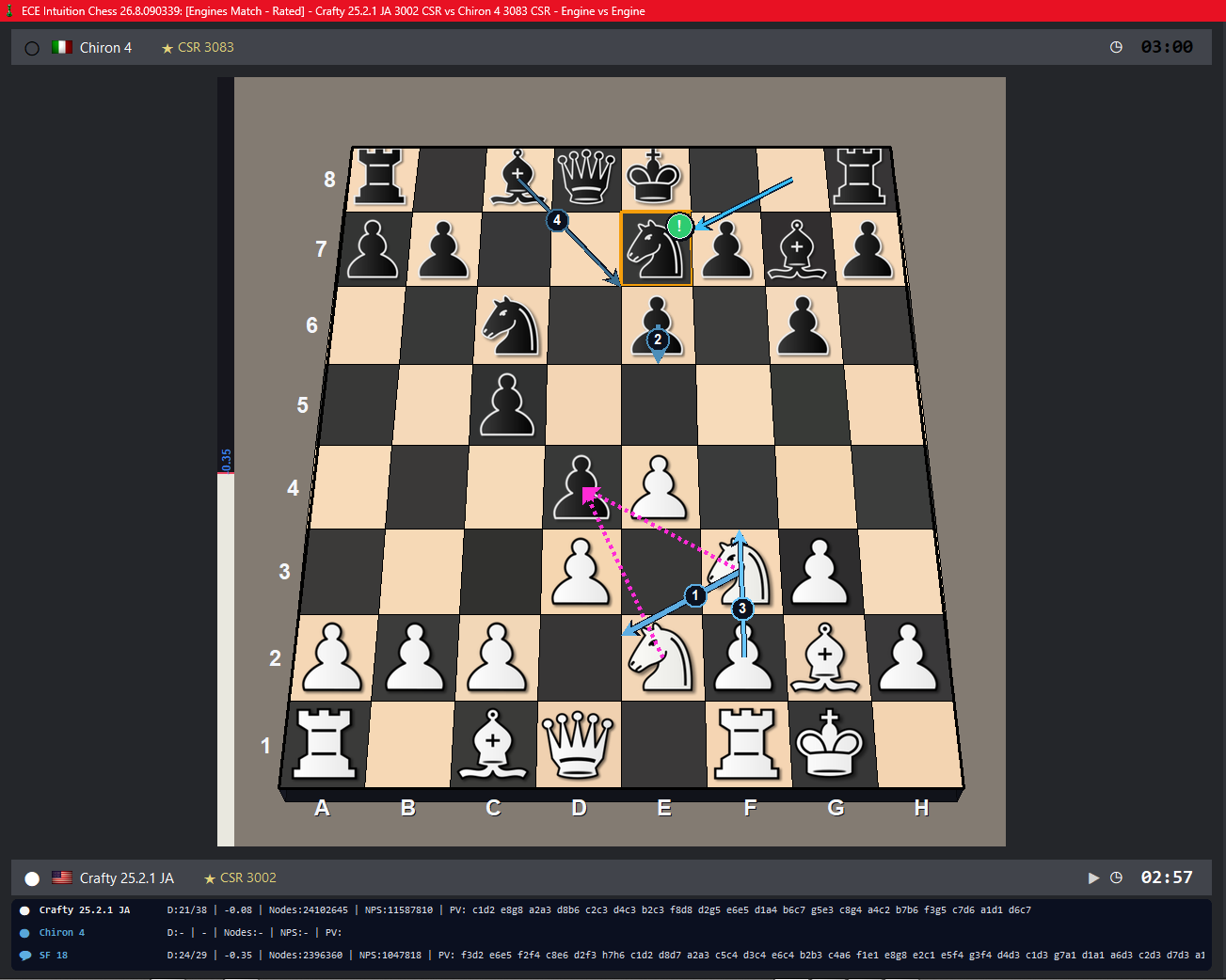
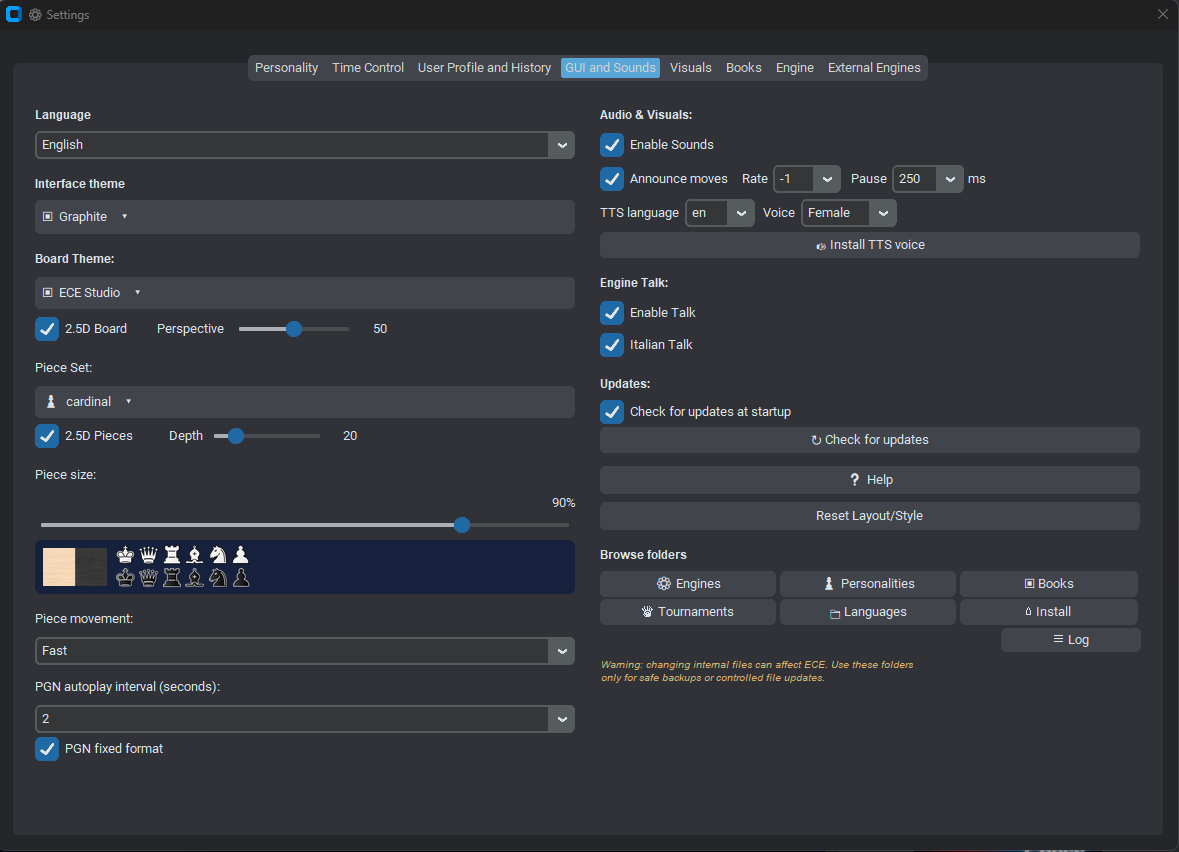
### New 2.5D Board
ECE 26.8 introduces a new 2.5D Board renderer.
This is intentionally not an OpenGL or hardware-based 3D board. Instead, the lightweight ECE renderer transforms the normal chessboard into a perspective view inspired by classic desktop chess programs and retro computer chess games.
The Perspective control allows the user to adjust the amount of board perspective.
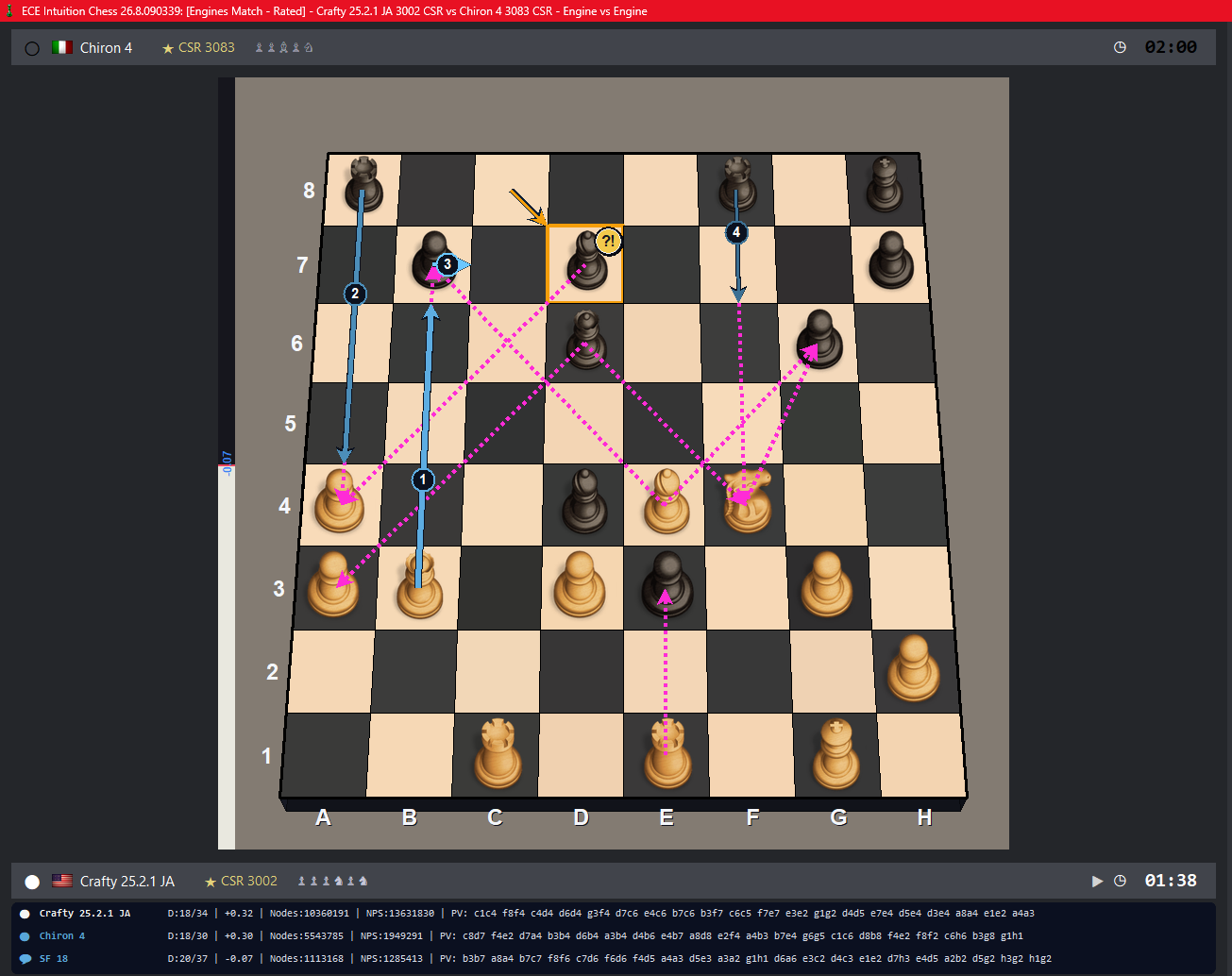
### New 2.5D Pieces
The new board is accompanied by 2.5D Pieces.
Normal 2D chess-piece artwork can be presented as standing pieces or figurines on the perspective board.
A dedicated **Depth** control determines how strongly the apparent size of the pieces changes toward the far side of the board.
Dedicated `3D_*` piece sets remain supported and are intentionally excluded from this additional transformation because their artwork already provides its own pseudo-3D appearance.
Users can therefore choose between:
* classic 2D board and pieces;
* normal 2D pieces transformed by the new 2.5D renderer;
* dedicated pseudo-3D/3D-style piece sets.
The current factory visual configuration uses:
**ECE Studio board + Cardinal pieces + 2.5D Board + 2.5D Pieces**
All these visual choices remain configurable and persistent.
### Improved game-analysis graph
The evaluation graph has also been revised.
In long games, very large evaluations near the end could previously compress the rest of the graph and make meaningful changes around equality appear almost flat.
ECE now uses a chess-oriented non-linear visual scale.
Most of the available graph resolution is dedicated to the strategically important range around:
0, ±1, ±2, ±3 and ±5 pawns.
Advantages beyond approximately ±5 are progressively compressed, while very large evaluations and mate scores no longer destroy the visual resolution of the earlier stages of the game.
Move-to-move changes remain visible even in long games, and graph points automatically become smaller as the number of moves increases.
### Board presentation improvements
Several additional visual refinements are included.
Move arrows have been redesigned to be thinner and more elegant. Normal move arrows now stop at the edge of the destination square instead of covering the destination piece.
Check and checkmate visualization has also been revised, replacing the previous flat red square with a stronger graduated red glow around the king.
Move-classification badges such as `!!`, `!`, `?!`, `?` and `??` have also received graphical refinements while preserving the standard chess annotation symbols.
### Tournament and GUI improvements
Tournament management has also received several refinements.
Long custom engine/personality tournaments can use an optional automatic GUI restart after a configurable number of completed games.
ECE saves the tournament state, closes the engine processes and then resumes automatically from the next game after the GUI restarts.
This feature operates only while the corresponding custom tournament is active and does not affect normal games.
Several tournament and Career windows have also received layout and usability improvements.
---
I'll also post some screenshots showing the new 2.5D Board and 2.5D Pieces.
ECE Intuition Chess GUI 26.8.090339 is already available from the ECE website and includes ECE Engine 26.8 Intuition HBuP in the GUI bundle.
Luigino Viscione
Developer of ECE / ECE Chess GUI
 https://www.ecechess.it
 luigino.viscione@gmail.com
Hi everyone,
ECE Intuition Chess GUI 26.8.090339 is now available.
This release includes the matching ECE Engine 26.8 Intuition HBuP directly in the GUI package, together with updated personality support, Chess960/Fischer Random improvements, a new 2.5D board presentation, visual refinements and a revised game-analysis graph.
### ECE Engine 26.8 included in the GUI package
ECE Intuition Chess GUI 26.8.090339 includes ECE Engine 26.8 Intuition HBuP as part of the standard distribution.
The engine remains usable separately as a normal UCI engine in other compatible chess GUIs, while the ECE GUI provides deeper integration with its personality system, tournaments, analysis tools and player-management features.
The ECE 26.8 distribution includes the engine personalities, opening books and related resources.
The current ECE 26.8 personality profiles use the versioned naming convention:
ECE_26.8*.epr
ECE personalities are integrated as first-class players inside the GUI, allowing the same engine executable to represent many different playing styles, strengths and behaviours through the personality profiles.
Several aspects of the interaction between the GUI, ECE Engine 26.8 and the personality system have also been refined in this release.
### Chess960 / Fischer Random improvements
Chess960 support has been revised and improved.
ECE now provides a dedicated Chess960 starting-position selector supporting all 960 legal Fischer Random starting positions.
The user can:
* manually select a Chess960 position from 0 to 959;
* generate a random legal Chess960 starting position;
* immediately see the corresponding starting FEN;
* paste a Chess960 FEN directly into the selector;
* have the pasted FEN validated before the game starts.
If the pasted FEN corresponds to one of the canonical 960 initial positions, ECE can also associate it with the corresponding Chess960 position number.
Invalid Chess960 FENs are rejected.
Several fixes have also been made to the internal handling of Chess960 positions, engine communication, castling and position state.
ECE can recognize Chess960 games from PGN variant information and preserve the correct variant and starting position during analysis.
The Chess960 state is also passed to compatible engines using the appropriate Chess960 configuration and starting FEN.
### New 2.5D Board
ECE 26.8 introduces a new 2.5D Board renderer.
This is intentionally not an OpenGL or hardware-based 3D board. Instead, the lightweight ECE renderer transforms the normal chessboard into a perspective view inspired by classic desktop chess programs and retro computer chess games.
The Perspective control allows the user to adjust the amount of board perspective.
### New 2.5D Pieces
The new board is accompanied by 2.5D Pieces.
Normal 2D chess-piece artwork can be presented as standing pieces or figurines on the perspective board.
A dedicated **Depth** control determines how strongly the apparent size of the pieces changes toward the far side of the board.
Dedicated `3D_*` piece sets remain supported and are intentionally excluded from this additional transformation because their artwork already provides its own pseudo-3D appearance.
Users can therefore choose between:
* classic 2D board and pieces;
* normal 2D pieces transformed by the new 2.5D renderer;
* dedicated pseudo-3D/3D-style piece sets.
The current factory visual configuration uses:
**ECE Studio board + Cardinal pieces + 2.5D Board + 2.5D Pieces**
All these visual choices remain configurable and persistent.
### Improved game-analysis graph
The evaluation graph has also been revised.
In long games, very large evaluations near the end could previously compress the rest of the graph and make meaningful changes around equality appear almost flat.
ECE now uses a chess-oriented non-linear visual scale.
Most of the available graph resolution is dedicated to the strategically important range around:
0, ±1, ±2, ±3 and ±5 pawns.
Advantages beyond approximately ±5 are progressively compressed, while very large evaluations and mate scores no longer destroy the visual resolution of the earlier stages of the game.
Move-to-move changes remain visible even in long games, and graph points automatically become smaller as the number of moves increases.
### Board presentation improvements
Several additional visual refinements are included.
Move arrows have been redesigned to be thinner and more elegant. Normal move arrows now stop at the edge of the destination square instead of covering the destination piece.
Check and checkmate visualization has also been revised, replacing the previous flat red square with a stronger graduated red glow around the king.
Move-classification badges such as `!!`, `!`, `?!`, `?` and `??` have also received graphical refinements while preserving the standard chess annotation symbols.
### Tournament and GUI improvements
Tournament management has also received several refinements.
Long custom engine/personality tournaments can use an optional automatic GUI restart after a configurable number of completed games.
ECE saves the tournament state, closes the engine processes and then resumes automatically from the next game after the GUI restarts.
This feature operates only while the corresponding custom tournament is active and does not affect normal games.
Several tournament and Career windows have also received layout and usability improvements.
---
I'll also post some screenshots showing the new 2.5D Board and 2.5D Pieces.
ECE Intuition Chess GUI 26.8.090339 is already available from the ECE website and includes ECE Engine 26.8 Intuition HBuP in the GUI bundle.
Luigino Viscione
Developer of ECE / ECE Chess GUI
 https://www.ecechess.it
 luigino.viscione@gmail.com
-
Graham Banks

- Posts: 46523
- Joined: Sun Feb 26, 2006 10:52 am
- Location: Auckland, NZ
Re: ECE Intuition Chess
I use ChessGUI to broadcast my tournaments.LuiVis wrote: ↑Sun Aug 09, 2026 1:51 am Many years ago I used a simple chess GUI that I really liked for running engine tournaments and testing my own (rather humble!) engines: ChessGUI. I don't know how many of you remember it, but I think it's a pity that its development wasn't continued.
One feature I particularly liked was the possibility of showing engine matches live by generating a Live PGN. At that time, if I remember correctly, pgn4web was commonly used to display these games on a website.
So I tried to implement something similar in ECE.
During engine tournaments, ECE generates tournament results and crosstables in HTML/text format, the tournament PGN, and also a Live PGN that is continuously updated as the games progress.
However, to be completely honest, I haven't received enough feedback about this feature yet, and I haven't had a proper opportunity to test it on a real live website. So I can't guarantee that every generated piece of information is interpreted correctly by current web PGN viewers.
ECE Chess is mainly designed around chess players rather than engine testing. It supports engine tournaments and provides the related tools, but unlike some other GUIs, its primary purpose isn't just testing engines. The idea is to provide a GUI for people who play, study and analyse chess, while also allowing them to use and experiment with chess engines.
That's basically what the Live PGN feature is about.
Luigino Viscione
Developer of ECE / ECE Chess GUI
https://www.ecechess.it
luigino.viscione@gmail.com
Take a look here: https://ccrl.live/16069
gbanksnz at gmail.com
-
LuiVis
- Posts: 22
- Joined: Sat Jun 22, 2019 5:19 am
- Full name: Luigino Viscione
Re: ECE Intuition Chess
Haha Graham, I was almost certain you were still using ChessGUI! 
It really was a great piece of work, and even today I think it's an excellent GUI for running engine tournaments. Very simple and straightforward, but extremely effective at doing exactly what it was designed to do.
It's a real pity that its development didn't continue. With continued development over the years, I think ChessGUI could have become something truly exceptional.
I remembered that you used it, Graham... and I would have bet that you were still using it today!
And yes, I know the CCRL Live page very well. It's actually among the links in the footer of ecechess.it. I occasionally watch the games there... quietly from the shadows!
It's also one of the reasons I wanted to bring the Live PGN idea into ECE. I always liked that simple and effective approach.
Luigino Viscione

It really was a great piece of work, and even today I think it's an excellent GUI for running engine tournaments. Very simple and straightforward, but extremely effective at doing exactly what it was designed to do.
It's a real pity that its development didn't continue. With continued development over the years, I think ChessGUI could have become something truly exceptional.
I remembered that you used it, Graham... and I would have bet that you were still using it today!

And yes, I know the CCRL Live page very well. It's actually among the links in the footer of ecechess.it. I occasionally watch the games there... quietly from the shadows!
It's also one of the reasons I wanted to bring the Live PGN idea into ECE. I always liked that simple and effective approach.
Luigino Viscione
-
LuiVis
- Posts: 22
- Joined: Sat Jun 22, 2019 5:19 am
- Full name: Luigino Viscione
Re: ECE Intuition Chess
ECE Intuition Chess GUI 26.9.127933 Released
Hi everyone,
a new version of ECE Intuition Chess GUI is now available:
ECE Intuition Chess GUI 26.9.127933
This release mainly focuses on fixes, stability and usability improvements collected during recent testing.
Main changes:
• Improved and corrected Per Player time-control handling.
• Positions imported from FEN can now be used directly as the starting position of a playable game, making testing, analysis and study much easier.
• Improved analysis and Hint handling in some particular engine-response situations.
• Improved move, Hint, analysis, book and premove arrow presentation.
• Improved promotion and premove promotion handling.
• Improved Edit/Setup Board behaviour with 2.5D pieces.
• Improved PGN Event/round preservation after Career and tournament games.
• Refined game Accuracy calculation.
• Improved 2D/2.5D piece rendering reliability.
• Personality and engine selection is now considerably faster, with a new dynamic paginated browser that remains efficient even with very large personality collections.
• Various additional fixes and stability improvements.
ECE Engine
The engine included in the GUI bundle remains ECE 26.8 Intuition HBuP.
The 26.9 version number refers to the GUI release; it does not indicate a new engine version. As usual, the ECE 26.8 engine, the ECE_26.8 personality family, books and the dedicated integration are included in the GUI bundle.
Website change
pocochess.it is no longer the reference host for the project.
The official ECE Chess website and update source is now permanently:
https://www.ecechess.it
ECE Chess will use https://ecechess.it for future releases, downloads and automatic updates.
Thank you very much to everyone who is using ECE Chess, testing it, reporting problems and sharing suggestions. Your feedback has helped enormously during this development and stabilization phase.
And to everyone who has not had their holidays yet: have a wonderful and relaxing vacation!
Cheers,
Luigino Viscione
Developer of ECE / ECE Chess GUI
https://www.ecechess.it
luigino.viscione@gmail.com
Hi everyone,
a new version of ECE Intuition Chess GUI is now available:
ECE Intuition Chess GUI 26.9.127933
This release mainly focuses on fixes, stability and usability improvements collected during recent testing.
Main changes:
• Improved and corrected Per Player time-control handling.
• Positions imported from FEN can now be used directly as the starting position of a playable game, making testing, analysis and study much easier.
• Improved analysis and Hint handling in some particular engine-response situations.
• Improved move, Hint, analysis, book and premove arrow presentation.
• Improved promotion and premove promotion handling.
• Improved Edit/Setup Board behaviour with 2.5D pieces.
• Improved PGN Event/round preservation after Career and tournament games.
• Refined game Accuracy calculation.
• Improved 2D/2.5D piece rendering reliability.
• Personality and engine selection is now considerably faster, with a new dynamic paginated browser that remains efficient even with very large personality collections.
• Various additional fixes and stability improvements.
ECE Engine
The engine included in the GUI bundle remains ECE 26.8 Intuition HBuP.
The 26.9 version number refers to the GUI release; it does not indicate a new engine version. As usual, the ECE 26.8 engine, the ECE_26.8 personality family, books and the dedicated integration are included in the GUI bundle.
Website change
pocochess.it is no longer the reference host for the project.
The official ECE Chess website and update source is now permanently:
https://www.ecechess.it
ECE Chess will use https://ecechess.it for future releases, downloads and automatic updates.
Thank you very much to everyone who is using ECE Chess, testing it, reporting problems and sharing suggestions. Your feedback has helped enormously during this development and stabilization phase.
And to everyone who has not had their holidays yet: have a wonderful and relaxing vacation!
Cheers,
Luigino Viscione
Developer of ECE / ECE Chess GUI
https://www.ecechess.it
luigino.viscione@gmail.com
-
Rowen
- Posts: 131
- Joined: Tue Nov 15, 2016 1:19 pm
- Location: Cheshire, England
Re: ECE Intuition Chess
Thanks for your work, I use both the GUI and the standalone engine, and it is a fun engine to play against. Non fa niente but Ive noticed that when using the standalone engine in the fritz gui the personality drop down options do not work, in earlier versions it did .Not a huge problem as the personality can just be typed in.
-
LuiVis
- Posts: 22
- Joined: Sat Jun 22, 2019 5:19 am
- Full name: Luigino Viscione
Re: ECE Intuition Chess
Hi Rowen,
thank you very much for your feedback, and also for using both ECE Chess GUI and the standalone engine. I'm very happy to hear that you enjoy playing against ECE.
There is one important detail in what you described: if you still see a personality drop-down list, I suspect you may be using an older ECE engine version.
In ECE Engine 26.8 I removed that drop-down completely.
The reason is that the list was essentially static. It was acceptable when ECE had only a relatively small number of personalities, but today there are more than 300, and newly created or installed personalities could not be dynamically added to that UCI combo without reloading/rebuilding things. So it was no longer a good solution.
I originally tried to make personality management much simpler through UCI buttons. The engine could generate the personality list/tools and, in Arena, this worked very nicely. Unfortunately UCI GUI support for this behaviour is not consistent. Some GUIs do not expose these buttons correctly, while others display them but do nothing when they are pressed.
For example, I personally have Fritz 8, 17, 19 and 20. In my Fritz installations the personality-related buttons are displayed, but pressing them does not launch the tools. Arena handles them correctly.
For this reason ECE 26.8 uses a Personality Path instead of the old drop-down.
In Arena you can use the folder/browse control to select an .epr personality directly. In GUIs such as Fritz, where that browse control is not provided, the path can simply be entered manually.
The ECE package also contains two CMD utilities. They provide access to the Personality Explorer and Personality Creator/Editor outside the chess GUI. The engine can generate/update the HTML data, but the HTML page itself cannot simply scan arbitrary local directories because of normal browser/Windows security restrictions. The small CMD utilities solve that problem by generating the required local data before opening the HTML tools.
So if you are currently seeing the old personality drop-down, could you please check which ECE version Fritz is actually loading?
With ECE 26.8, I also recommend reinstalling/updating the supplied personality package. The current official personalities use the 26.8 naming/reference system (for example ECE_26.8_*.epr), so using the matching engine and personality package is important.
By default ECE 26.8 plays at its full strength, corresponding to:
ECE_26.8_Intuition.epr
You can then replace that with the path of another personality.
The personality system is still somewhat more sophisticated when ECE runs inside ECE Chess GUI, because the GUI can communicate additional information directly to the engine. But most of the personality behaviour is available with the standalone engine as well.
The good news is that ECE Chess GUI 26.9.156997, released on August 15, 2026, is now looking very stable after the recent Career, tournament, board-redraw, analysis and interface work. So I can finally spend some more time again on the standalone engine and investigate whether I can make personality management simpler and more universally compatible across different GUIs.
Your report is therefore very useful to me.
Thank you again, Rowen, both for testing ECE and for taking the time to report it.
Luigino Viscione
Developer of ECE / ECE Chess GUI
https://www.ecechess.it
luigino.viscione@gmail.com
thank you very much for your feedback, and also for using both ECE Chess GUI and the standalone engine. I'm very happy to hear that you enjoy playing against ECE.
There is one important detail in what you described: if you still see a personality drop-down list, I suspect you may be using an older ECE engine version.
In ECE Engine 26.8 I removed that drop-down completely.
The reason is that the list was essentially static. It was acceptable when ECE had only a relatively small number of personalities, but today there are more than 300, and newly created or installed personalities could not be dynamically added to that UCI combo without reloading/rebuilding things. So it was no longer a good solution.
I originally tried to make personality management much simpler through UCI buttons. The engine could generate the personality list/tools and, in Arena, this worked very nicely. Unfortunately UCI GUI support for this behaviour is not consistent. Some GUIs do not expose these buttons correctly, while others display them but do nothing when they are pressed.
For example, I personally have Fritz 8, 17, 19 and 20. In my Fritz installations the personality-related buttons are displayed, but pressing them does not launch the tools. Arena handles them correctly.
For this reason ECE 26.8 uses a Personality Path instead of the old drop-down.
In Arena you can use the folder/browse control to select an .epr personality directly. In GUIs such as Fritz, where that browse control is not provided, the path can simply be entered manually.
The ECE package also contains two CMD utilities. They provide access to the Personality Explorer and Personality Creator/Editor outside the chess GUI. The engine can generate/update the HTML data, but the HTML page itself cannot simply scan arbitrary local directories because of normal browser/Windows security restrictions. The small CMD utilities solve that problem by generating the required local data before opening the HTML tools.
So if you are currently seeing the old personality drop-down, could you please check which ECE version Fritz is actually loading?
With ECE 26.8, I also recommend reinstalling/updating the supplied personality package. The current official personalities use the 26.8 naming/reference system (for example ECE_26.8_*.epr), so using the matching engine and personality package is important.
By default ECE 26.8 plays at its full strength, corresponding to:
ECE_26.8_Intuition.epr
You can then replace that with the path of another personality.
The personality system is still somewhat more sophisticated when ECE runs inside ECE Chess GUI, because the GUI can communicate additional information directly to the engine. But most of the personality behaviour is available with the standalone engine as well.
The good news is that ECE Chess GUI 26.9.156997, released on August 15, 2026, is now looking very stable after the recent Career, tournament, board-redraw, analysis and interface work. So I can finally spend some more time again on the standalone engine and investigate whether I can make personality management simpler and more universally compatible across different GUIs.
Your report is therefore very useful to me.
Thank you again, Rowen, both for testing ECE and for taking the time to report it.
Luigino Viscione
Developer of ECE / ECE Chess GUI
https://www.ecechess.it luigino.viscione@gmail.com