Elements of the ULTIMATE Chess GUI?

Discussion of anything and everything relating to chess playing software and machines.

Moderator: Ras

Ferdy
Posts: 4856
Joined: Sun Aug 10, 2008 3:15 pm
Location: Philippines

Re: GUI and features

Post by Ferdy »

It is intuitive, most useful for beginners.

(1) Want to change related to board, a beginer can easily press the board menu.

Image


(2) Want to analyze then press analysis.

Image


(3) A beginner gets curious about the engine.

Image


(4) Short description of what a button can do is provided.

Image
User avatar
hgm
Posts: 28519
Joined: Fri Mar 10, 2006 10:06 am
Location: Amsterdam
Full name: H G Muller

Re: GUI and features

Post by hgm »

The explanatory popups are definitely a very nice features. I built a similar 'instant help' functionality in XBoard, where right-clicking on any dialog item or menu item would pop up a notice with the corresponding paragraph of the manual.

This goes a bit beyond 'attractive look', however; it is a whole new feature.

The menu 'ribbons' are a total mess, however, the name of all items chaotically spread over a huge area, sometimes as one line, sometimes split into two lones, with completely meaningless pictograms of different sizes, sometimes above the text, sometimes left of it. In some cases the 'pictogram' actually seems a checkbox, that you can tick...

If I would rate the WinBoard main menus as 7 out of 10, I would rate this as 2, in terms of attractiveness.

I was pretty sure that blue squased arrow had some function. The point is that to put it in that location with that shape is extremely ugly. Hard to imagine a worse place and shape for it.

I am somewhat neutral as to whether separating a "board" menu from the "view" menu is good or bad. To change anything on the look of the board "view" would be the obvious place to look, in absence of a "board" menu. I would certainly not look for opening-book stuff in an "Analysis" menu.
User avatar
hgm
Posts: 28519
Joined: Fri Mar 10, 2006 10:06 am
Location: Amsterdam
Full name: H G Muller

Re: Elements of the ULTIMATE Chess GUI?

Post by hgm »

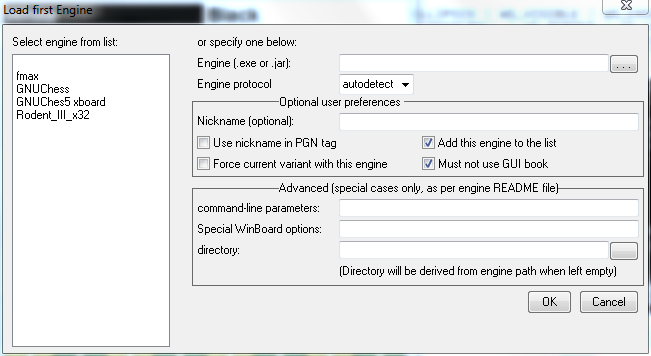
I have tweeked the design of WinBoard's Load Engine dialog a bit, so that it should appeal more to idiot users. The new design replaces the checkboxes for protocol choice by a single combobox. This now also has 'autodetect' as an option:

Image

Given that there now is autodetect, I am in doubt whether the protocol selector should be moved to the Advanced group box or not.

I am still thinking about whether it would be useful to put a number of buttons at the bottom, for organizing the listbox (e.g. Up, Down and Delete buttons)
Ferdy
Posts: 4856
Joined: Sun Aug 10, 2008 3:15 pm
Location: Philippines

Re: Elements of the ULTIMATE Chess GUI?

Post by Ferdy »

hgm wrote:I have tweeked the design of WinBoard's Load Engine dialog a bit, so that it should appeal more to idiot users. The new design replaces the checkboxes for protocol choice by a single combobox. This now also has 'autodetect' as an option:

Image

Given that there now is autodetect, I am in doubt whether the protocol selector should be moved to the Advanced group box or not.

I am still thinking about whether it would be useful to put a number of buttons at the bottom, for organizing the listbox (e.g. Up, Down and Delete buttons)
How about this?

Image
User avatar
hgm
Posts: 28519
Joined: Fri Mar 10, 2006 10:06 am
Location: Amsterdam
Full name: H G Muller

Re: Elements of the ULTIMATE Chess GUI?

Post by hgm »

The "(optional)" is already scheduled for deletion. But this will break all translations, if I don't adapt the English message in the language files, and until I have time to do that, I wanted to leave it in as a reminder.

Idiots should certainly stick to operating the green button. But the directory field is in the 'Advanced' group box, which is supposed to keep the idiots out. It is relatively common that engine executables exist in a "bin" sub-directory in their distro folder, separated from their support files (such as settings and book).

"Engine parameters" is stead of "command-line parameters" is a good idea.

I think that indeed protocol selection should move to the Advanced section, now there is auto-detection. Idiots should always use the latter.

Why do you think "Must not use GUI book" is an "Advanced" setting? Even an idiot user is supposed to know what "opening book" or "GUI" means. If there is doubt about the latter, the message could be changed to "Must not use the common book". In addition it is not possible to wreck anything, no matter what setting you choose; it just might not do exactly what you want because it would do what you asked for.

I don't think "Set up the engine" is very clear. If a change is needed I would prefer "Or select a new one:".

The "If specified" seems a bit superfluous. Even an idiot should understand that you cannot use something that is not specified. Potentially you could add "If specified" to any entry in any dialog ("Engine (.exe), if specified"). If you think it is not sufficiently clear that 'nickname' in the checkbox refers to the 'Nickname' in the text entry, the text could be altered in "Use the above nickame in stored games".

As to explicitly showing the "current variant". It seems usually the user would know what variant he is in (even if that this is just that "he is playing no variant"). Remember this dialog will not be the only thing he is seeing; the main window would still be visible behind it, and the variant indication could come from there as well. If we want to go out of our way here, the message itself could be made into "Use for %s only", where %s is the variant name. And then disable (or hide) the checkbox if the current variant is 'normal'.

It doesn't seem wise to remove the "Add this engine to the list" if there would not at least a method provided to delete an engine from the list (E.g. a button "Delete Engine"). Otherwise the only way to control list pollution would be to edit the engine list, which starts to look more and more cluttered now that it is also used for storing the engine-option settings. The advantage I can see is that the Delete Engine button would be more flexible, as you can also use it to delete obsolete engines from the list. The downside is that it requires you to re-open the engine dialog, select the engine you just was forced to install against your wishes, press the button, and then 'cancel'. Perhaps one could argue that this happens infrequently enough that it doesn't add much work on the average. But it never saves anything, the 'upside' is purely cosmetic. Eventually this approach would lead to an extra groupbox "List Management" with buttons "Delete", "Move Up" and "Move Down" at the bottom of the dialog.

Why do you want to shorten the groupbox names to just one word? This seems more cryptic. I considered the word "preference" more to the point tha "optional" anyway; most of the settings are always there, what is optional is to change them from their defaults. Perhaps the title should be changed to "Preferences for use with this engine" or "Settings to use with this engine". (And the variant checkbox then simply the variant name.) As to "Advanced": do you really think that this single word is enough to deter idiot users from messing with it? The reminder that engines might be accompanied by something like a README file does't seem wasted on most people.
PK
Posts: 918
Joined: Mon Jan 15, 2007 11:23 am
Location: Warsza

Re: Elements of the ULTIMATE Chess GUI?

Post by PK »

This is how a beautiful GUI looks like. Sadly, it's not for chess: http://sabaki.yichuanshen.de/
User avatar
hgm
Posts: 28519
Joined: Fri Mar 10, 2006 10:06 am
Location: Amsterdam
Full name: H G Muller

Re: Elements of the ULTIMATE Chess GUI?

Post by hgm »

Image

It doesn't seem very different in philosophy from XBoard: just show the board, and a narrow horizontal strip of additional info. The difference is in what additional info exactly you want shown. The Go GUI doesn't show any PV; one assumes that it is mainly intended for human-human games, or just game editing. It also shows no clocks. I don't think the way XBoard shows clocks (and side to move) does make it look less elegant. One assumes that in the Go GUI it has to be deduced from the last move marker who is on move. (Which seems strange in Go, as you are allowed to pass your turn there...)

The Go GUI hides the main menu bar, or at least reduces it to a button. This might be a good idea. It has become somewhat of a standard nowadays to not show menu bars by default, but only after pressing of the Alt key. In XBoard there also would be the possibility to patch it such that the menu bar only appears when the mouse gets close; the presence of the clocks guarantees that you never need to be close during normal operation of the board. I think I even made a version once that did this. I did not consider that a complete success, as opening the menu bar would push everything down, making it distinctly 'unquiet'; I would have preferred if it would just partly cover the clocks. (But that was not feasible in the GTK widget set.)

It could be that in some themes of newer window managers this is even automatic; I noticed that recent Ubuntus tend to hide the menu bar, and overlay it onto the widow title bar when you hover the mouse over there.
Ferdy
Posts: 4856
Joined: Sun Aug 10, 2008 3:15 pm
Location: Philippines

Re: Elements of the ULTIMATE Chess GUI?

Post by Ferdy »

[Moderation] This message was lost due to stupidity of the moderator. :oops: :cry:

I am so sorry, Ferdinand. I must have hit the edit button when I intended to hit the quote button. Almost all of the original message is quoted in the message below, however.

H.G.
User avatar
hgm
Posts: 28519
Joined: Fri Mar 10, 2006 10:06 am
Location: Amsterdam
Full name: H G Muller

Re: Elements of the ULTIMATE Chess GUI?

Post by hgm »

Ferdinand Mosca wrote:I still don't understand the usage of directory in Winboard. Perhaps in Xboard I don't know. The user can just locate the engine file thru the green button and it is done.
What if the 'engine' is Nodejs or the Python interpreter? The directory where you installed Python is not relevant for the engine.
It is my belief that generally idiots don't like to see options. Once it is there, the idiot would read it, try to understand it in other words become preoccupied with it. So the idea is to present options as minimal as possible. Just make the idiot press the button to locate the engine filename, press OK done.
Although this is true to some extent, I think that it this case this is an unjustified fear. There are limits even to the idiocy of an idiot. What would there possibly be to misunderstand in "must not use common book"? Even if he did not know there existed a feature like a common book, and that it is possible to make any engine use it, this sentence should alert him to that fact. And the use of the word 'common' might even guide him to the Common Engine Settings dialog when he gets the idea to change this book. I only see upsides in this case.
I prefer the words, setup and install, meaning the engine is not yet recognized by the GUI or not in the engine list. I believe idiots generally are familiar with these words.
The word 'select' doesn't seem to be an unusual word that should be out of anyone's vocabulary either. 'Install' is a misnomer; in general it means running the installer of a piece of software that you have downloaded, to put it in usable form on your disk. And actually the dialog sets up the GUI to use the engine. It doesn't set up the engine.
The statement "If specified, use it in pgn tag" is just my comment which I happen to put it there in the blank text box because of limited space in the image, it does not have to be written there. Just keep the textbox empty, and whenever the user filled it in, then use it in the pgn tag. There is no need to create a checkbox option of whether the user would want to use the nickname in the pgn tag or not.
Normally you would not want nicknames in PGN. PGN are intended as a medium for interchange. People might publish their games, and if they do it with names in the player tags that are only meaningful to themselves, it can only cause confusion. I consider nicknames in the PGN a very bad thing. Primarily the nicknames are intended for display in the list, since engines nowadays have often very long and cumbersome names, indicating their compilation date, CPU-features requirements, etc.

A valid reason for using nicknames in PGN would be if you somehow configured a second copy of the same engine in a non-standard way, e.g. by an elo-limiting option, and want to distinguish them. (You might possibly want to run them in the same tourny, e.g. different versions with different time odds. Normal rating programs would choke on this, as they would ignore the TC tag.)
I believe this info is important as we are dealing with an idiot. Both Winboard and engine may go crazy because the idiot may enable the -variant crazyhouse and in fact the engine does not support it. It would be a lot of trouble.
That is a problem that is not really related to this option. The option merely determines if the engine will go into the list as one that should automatically cause the GUI to switch to Crazyhouse if it is loaded. Which would not have any effect at the time you use the dialog, as you would already be in the variant. So there is nothing to switch. The real problem is that you could be in Crazyhouse, and then use the dialog to load an engine that does not support it. Which you could do whether this checkbox exists or not. The solution is simply to make the install fail (and swicth the GUI back to game-viewer mode if it was the first engine) if an engine turns out not to support it. Or, if there is currently no game loaded, automatically switch to a variant that the engine does support.

Assuming that this works fool-proof, so that you cannot install inapplicable engines, it is still convenient to be able to limit multi-variant engines to a variant other than their primary one. E.g. many engines play both normal Chess and Crazyhouse (or Chess and Chess960), and this feature is there to enable them to install them once as normal Chess engine, and a second time as Crazyhouse engine.

BTW, in my latest attempt I already had implemented mentioning the actual variant in the checkbox text (see below). And it will be disabled in 'variant normal'. (Not sure if that is good, now that I think about it.)
For optional, its for simplicity. In the Advanced (special cases only, as per engine README file), see the as per engine README file, but you have Special Winboard options: and directory and command line parameters. It is somewhat inconsistent.
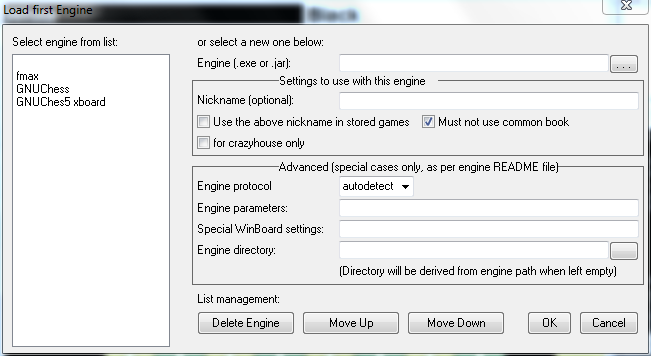
Well, ideally an engine README file would also specify if any special GUI options are needed to run the engine (such as /xreuse, because it cannot play more than one game). But perhaps this is expecting too much. But you could call this "erring on the safe side". I want to make it quite clear that there is no justification for touching anything inside that box for an idiot user, unless explicitly instructed to do so.

Image

(The list-management buttons are currently just for show; they don't do anything. There still seems to be a conceptual problem of what to do when the user opens the dialog only for reorganizing the list. If he presses OK he would load a new engine, so he should exit by pressing 'cancel'. Which is pretty illogical, as you might expect that this would also cancel the manipulations he did to the list.)
Ferdy
Posts: 4856
Joined: Sun Aug 10, 2008 3:15 pm
Location: Philippines

Re: Elements of the ULTIMATE Chess GUI?

Post by Ferdy »

hgm wrote:
Ferdinand Mosca wrote:I still don't understand the usage of directory in Winboard. Perhaps in Xboard I don't know. The user can just locate the engine file thru the green button and it is done.
What if the 'engine' is Nodejs or the Python interpreter? The directory where you installed Python is not relevant for the engine.
Does that mean the user is required to fill up the directory text box when nodejs or python engine is going to be installed?