Well, it seems that at least gets you connected to Stockfish. If you would type
uci
now in that window Stockfish should send you its options. Terminate the test by typing
quit
in that window. Can you then type
ipconfig
and paste here what you see?
Arena 3.5.1 - Autoplayer
Moderator: Ras
-
hgm

- Posts: 28485
- Joined: Fri Mar 10, 2006 10:06 am
- Location: Amsterdam
- Full name: H G Muller
-
Nordlandia

- Posts: 2834
- Joined: Fri Sep 25, 2015 9:38 pm
- Location: Sortland, Norway
Re: Arena 3.5.1 - Autoplayer
I sent you message, make sure to check it out.hgm wrote:Well, it seems that at least gets you connected to Stockfish. If you would type
uci
now in that window Stockfish should send you its options. Terminate the test by typing
quit
in that window. Can you then type
ipconfig
and paste here what you see?
Also i noticed something positive
C:\WINDOWS\system32>I:\connect64\connect64.exe -ec "stockfish 7 x64 bmi2.exe" -ed "F:\Chess Engines\New Stockfish\Stockfish 7\Stockfish 7
# waiting to connect
# set up server
# listening on port 27015
# accepted incoming call
# started stockfish 7 x64 bmi2.exe
# connected
telluser recv failed with error: 10054
# quit stockfish 7 x64 bmi2.exe
telluser send failed (error 10054)
# Process died
# waiting to connect
# set up server
# listening on port 27015
This is something new and positive sign.
-
hgm
- Posts: 28485
- Joined: Fri Mar 10, 2006 10:06 am
- Location: Amsterdam
- Full name: H G Muller
Re: Arena 3.5.1 - Autoplayer
Indeed, this is how it should look. When a connection request comes in it starts the engine, and when the engine is quit or the connection breaks it shuts down the engine, and starts waiting for a new connection request.
-
Nordlandia
- Posts: 2834
- Joined: Fri Sep 25, 2015 9:38 pm
- Location: Sortland, Norway
Re: Arena 3.5.1 - Autoplayer
Was this triggered by computer B?
-
hgm
- Posts: 28485
- Joined: Fri Mar 10, 2006 10:06 am
- Location: Amsterdam
- Full name: H G Muller
Re: Arena 3.5.1 - Autoplayer
I think it was triggered when you used the other command-prompt window on computer A to connect via 127.0.0.1.
-
Nordlandia
- Posts: 2834
- Joined: Fri Sep 25, 2015 9:38 pm
- Location: Sortland, Norway
Re: Arena 3.5.1 - Autoplayer
Alright.
So when is the appropriate time to install connect64.exe as engine in gui?
So when is the appropriate time to install connect64.exe as engine in gui?
-
hgm
- Posts: 28485
- Joined: Fri Mar 10, 2006 10:06 am
- Location: Amsterdam
- Full name: H G Muller
Re: Arena 3.5.1 - Autoplayer
Well, if we cannot get it to connect when we start it from the command line, the GUI will not fare any better. I just tried it between two of my computers, and it worked without a problem. I run the engine on a Win 8.1 system that also has AVG on it. Before starting connect64 as server on that machine I created an exception for it in AVG, Options -> Advanced Settings -> Exceptions like this:
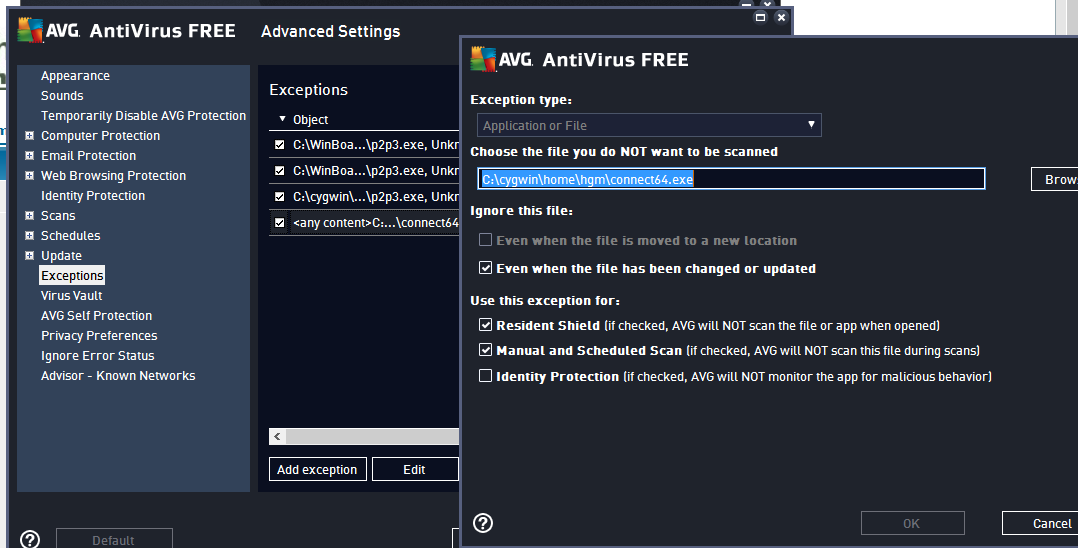
Is that also what you have?
Is that also what you have?
-
Nordlandia
- Posts: 2834
- Joined: Fri Sep 25, 2015 9:38 pm
- Location: Sortland, Norway
Re: Arena 3.5.1 - Autoplayer
Yes i used your settings in that particular connect64.exe in AVG. On computer B i have AVAST installed and added that file into exclusion as well.
Hopefully it may work now.
Connected!
Now what to do
Edit: the GUI won't allow me install connect64.exe as gui for some strange reasons.
Hopefully it may work now.
Connected!
Now what to do
Edit: the GUI won't allow me install connect64.exe as gui for some strange reasons.
-
Nordlandia
- Posts: 2834
- Joined: Fri Sep 25, 2015 9:38 pm
- Location: Sortland, Norway
Re: Arena 3.5.1 - Autoplayer

It is recommended to install connect64.exe as UCI or winboard?
-
hgm
- Posts: 28485
- Joined: Fri Mar 10, 2006 10:06 am
- Location: Amsterdam
- Full name: H G Muller
Re: Arena 3.5.1 - Autoplayer
I knew it had to be some other firewall!
You should install it the same way you would install the engine that is running at the other side. Connect64.exe is just a proxy for the engine on the other machine, it behaves exactly as that remote engine, and the GUI would not see the difference. So if you run a UCI engine there you should install connect64 as UCI in the GUI, when you run a WB engine you should install it as WB.
You should install it the same way you would install the engine that is running at the other side. Connect64.exe is just a proxy for the engine on the other machine, it behaves exactly as that remote engine, and the GUI would not see the difference. So if you run a UCI engine there you should install connect64 as UCI in the GUI, when you run a WB engine you should install it as WB.