Connecting Chess for Android to a Remote Server

Discussion of anything and everything relating to chess playing software and machines.

Moderator: Ras

User avatar
abik
Posts: 824
Joined: Fri Dec 01, 2006 10:46 pm
Location: Mountain View, CA, USA
Full name: Aart Bik

Connecting Chess for Android to a Remote Server

Post by abik »

I have received several questions on how to connect Chess for Android running on an Android device (e.g. a phone) as client to a remote chess server (e.g. a powerful desktop), so I decided to write a small document with detailed instructions (taken from my blog).

What you will need:
  • The server software from Bernhard Wallner's chess utilies, suited for your server's operating system (if, say, your desktop runs Windows, you will need to download the Windows version). You do not need to download the client software in this case.
  • The network enabled version of Chess for Android.
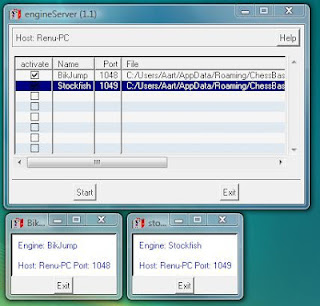
On the server, start the engine server software, and construct a new row for every engine you want to run remotely. Assign a name, port number, and select the full path to each engine binary (an executable that runs on the server). You can also supply command line options for starting the engine. Check the active checkboxes and click start when done. This yields something similar to the screenshots below. Here, I have started BikJump on port 1048 and Stockfish on port 1049.

Image

Next, you will have to find the IP address of your server. You can find this, for example, using the ipconfig utility. On a local network, you can also query the router for the IP addresses assigned to different computers. Note that running a globally accessible server behind a firewall requires a setup that is a bit outside the scope of this posting (for example, you may need DDNS if your IP address is assigned dynamically, and you may need to forward ports to your chess server in a router).

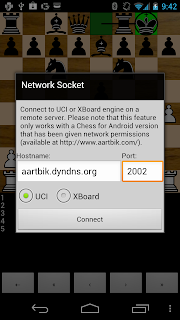
On the Android device, which will be your client, start Chess for Android, long press the notation window and then select "UCI and XBoard", followed by "Import Engine", followed by "Network Socket". In the pop-up window, enter the IP address or domain name in Hostname box, and the appropriate port in the Port box. Make sure you also make the correct UCI or XBoard selection. In the example below, my server was running on IP address 192.168.1.126 and I want to connect to stockfish on port 1049. If all has been done well, this pops up the engine setup window. Select the desired parameters (note that the endgame tablebases path name applies to your server, not the Android device) and press done.

Image Image

That's it! In the screenshots below, you see stockfish running remotely at about 867 KNs. In contrast, a screenshot with stockfish running as native ARM binary on the device is shown as well, running at about 67 KNs.

Image Image
User avatar
abik
Posts: 824
Joined: Fri Dec 01, 2006 10:46 pm
Location: Mountain View, CA, USA
Full name: Aart Bik

Re: Connecting Chess for Android to a Remote Server

Post by abik »

As a follow-up on the previous posting and for users that want to experiment with a remote chess server without setting one up themselves, I have, very temporarily, set up a remote chess server with various engines at ports 2000 through 2005 on aartbik.dyndns.org. Simply type this hostname and one of the ports in Chess for Android and let me know if you were able to connect!

Image
daws
Posts: 916
Joined: Wed Mar 08, 2006 10:03 pm

Re: Connecting Chess for Android to a Remote Server

Post by daws »

OK seems to work.

Tried ports 2002 and 2001 which gave me Bikjump and Stockfish respectively.


Cheers
daws
Posts: 916
Joined: Wed Mar 08, 2006 10:03 pm

Re: Connecting Chess for Android to a Remote Server

Post by daws »

Decided to try it using my own I7 860 as the server.

4 cores running at 2.93 ghz.

4034 KNs for Stockfish

Image
User avatar
abik
Posts: 824
Joined: Fri Dec 01, 2006 10:46 pm
Location: Mountain View, CA, USA
Full name: Aart Bik

Re: Connecting Chess for Android to a Remote Server

Post by abik »

daws wrote:OK seems to work.

Tried ports 2002 and 2001 which gave me Bikjump and Stockfish respectively.
Excellent. Thanks for trying out my experimental remote server :-)
daws wrote:Decided to try it using my own I7 860 as the server.

4 cores running at 2.93 ghz.

4034 KNs for Stockfish
Sweet!
User avatar
abik
Posts: 824
Joined: Fri Dec 01, 2006 10:46 pm
Location: Mountain View, CA, USA
Full name: Aart Bik

Re: Connecting Chess for Android to a Remote Server

Post by abik »

To close this thread properly; although it was lots of fun, I am shutting down this temporary remote chess server again. If you want to experiment again with connecting a client to a server, feel free to drop me a PM or email.